
Every inbox,
in one calm place.
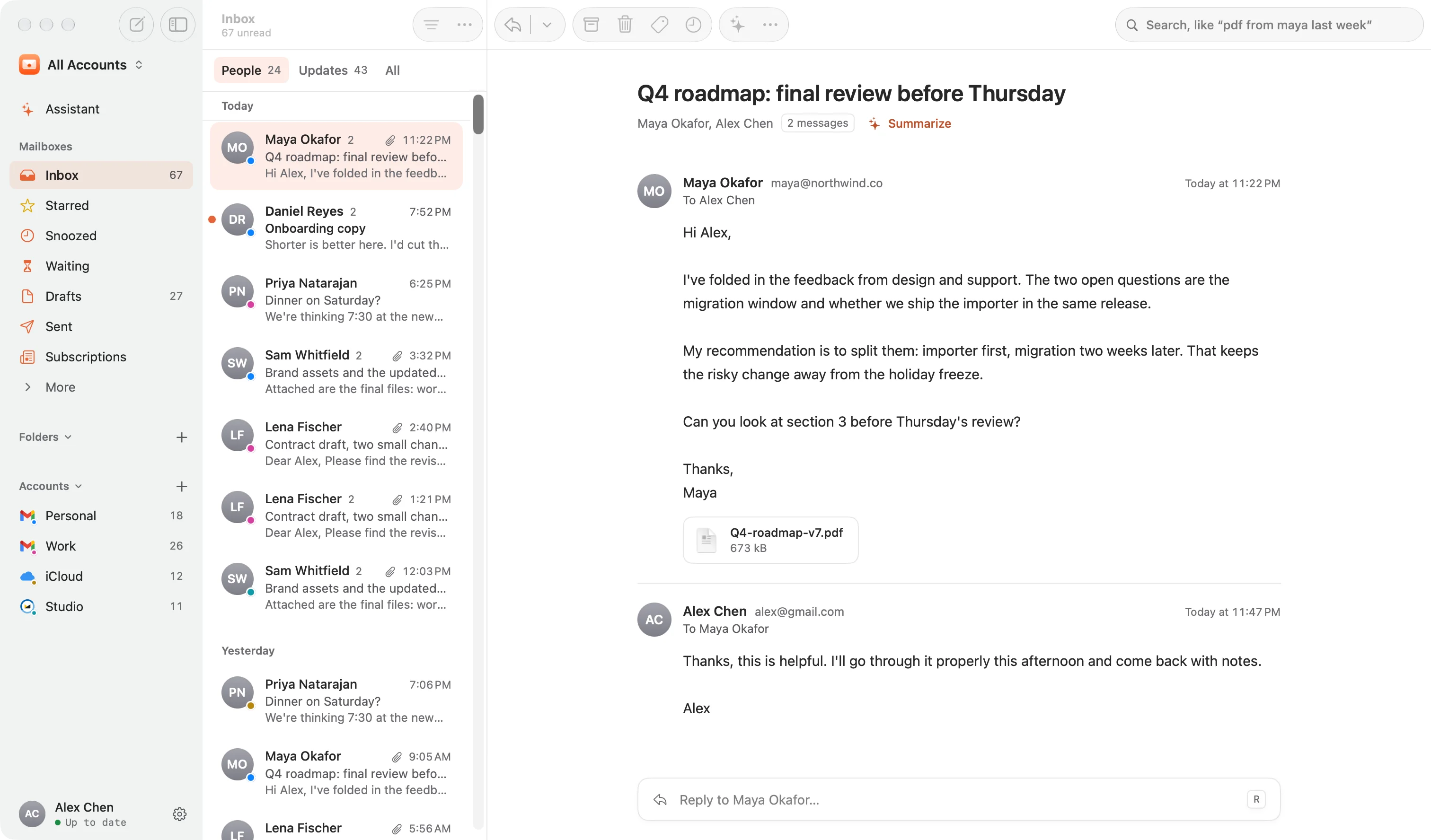
Gmail, iCloud, Outlook, Yahoo, Fastmail and any IMAP account in one fast, native Mac app, with a private AI assistant that works entirely on your Mac. Try it free for 14 days, then pay once.
macOS 14 or later · Apple silicon and Intel · Free for 14 days
- Gmail
- iCloud
- Outlook
- Yahoo
- Fastmail
- + any IMAP
Native, not a web page
Built in Swift for the Mac. It opens fast, scrolls smoothly through years of mail, and feels like it came with your Mac.
Private by design
Your mail goes straight between your Mac and your provider. There is no Glassmail mail server to see it.
Pay once, keep it
One price, every account, every version 1 update. No subscription, no account to make, no AI fee.
Private AI, built in
An assistant that knows your mail, and keeps it to itself.
Glassmail’s built-in AI reads, summarizes and writes on your Mac, so your mail isn’t sent to an AI company to do it. There’s no extra subscription, and it keeps working on a plane.
- Apple Intelligence on macOS 26
- Gemma and Qwen models on any Mac, Intel too
- Works offline
- No account, no API key

Ask your inbox
“What needs me today?” “Who hasn’t replied?” Answers come back as the actual conversations, sorted into what needs you and what can wait, with one click to act.
The gist of any thread
Summarize turns a long back-and-forth into a few lines: what it’s about and what you’re being asked to do, with the dates.
Replies in your voice
It learns your greeting, length and sign-off from mail you’ve sent, so drafts sound like you wrote them. Because you did, mostly.
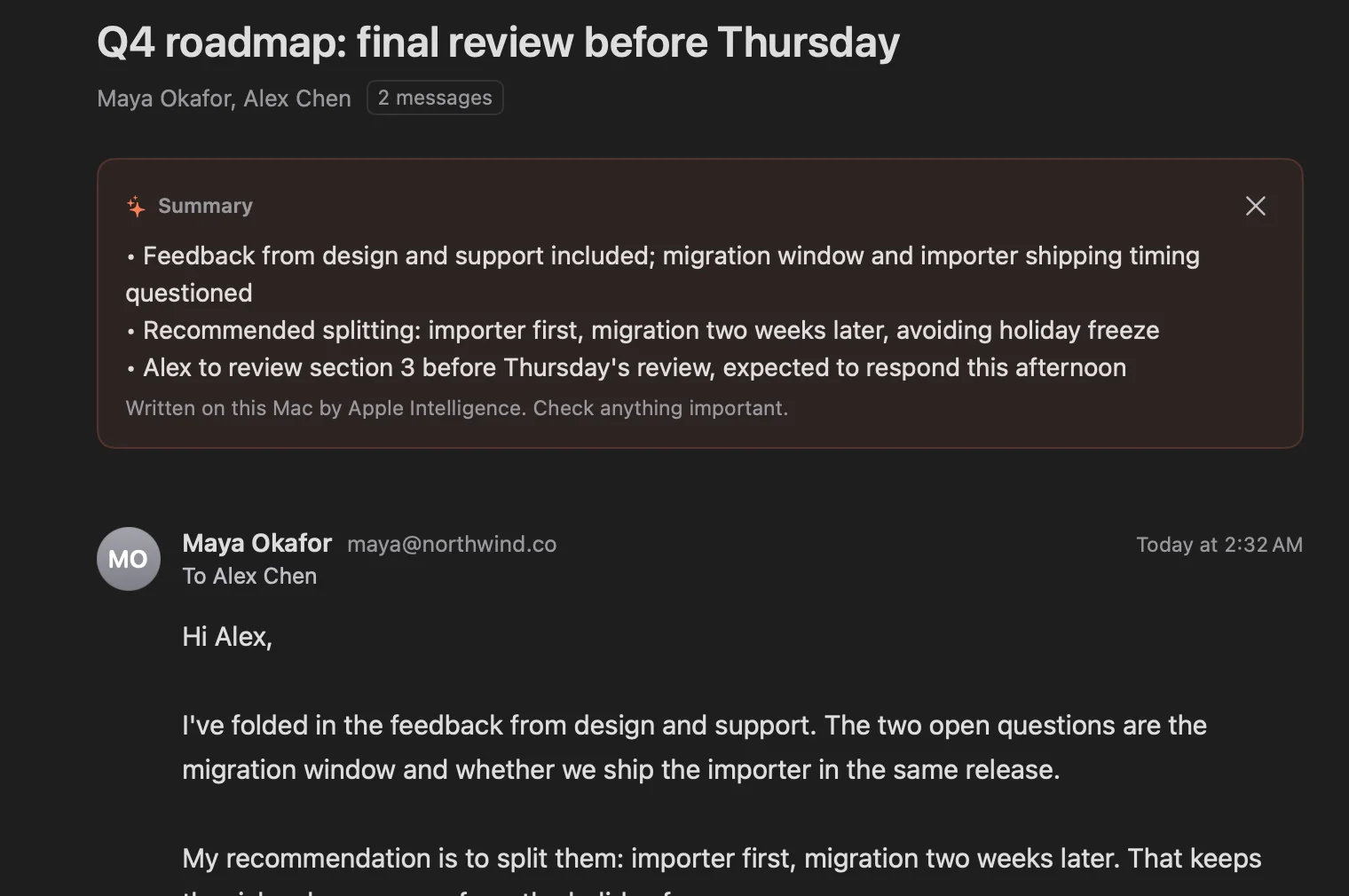
A real summary, written by Apple Intelligence on the Mac this screenshot was taken on.
Today
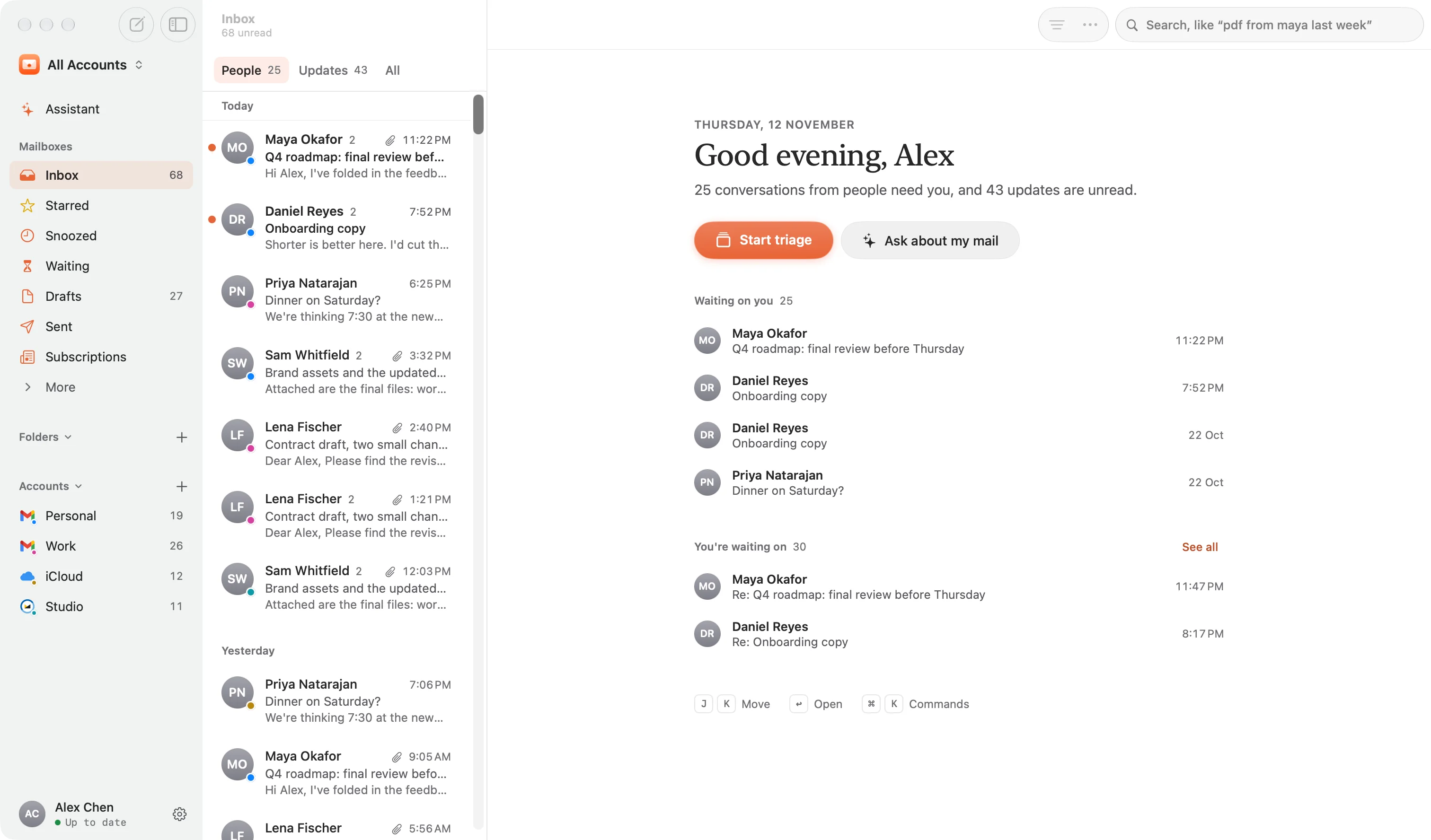
Open your Mac.
Know what needs you.
When nothing is open, Glassmail shows who’s waiting on you, the sign-in code you just asked for, and who you’re still waiting to hear from. One sentence, then the few conversations that matter.
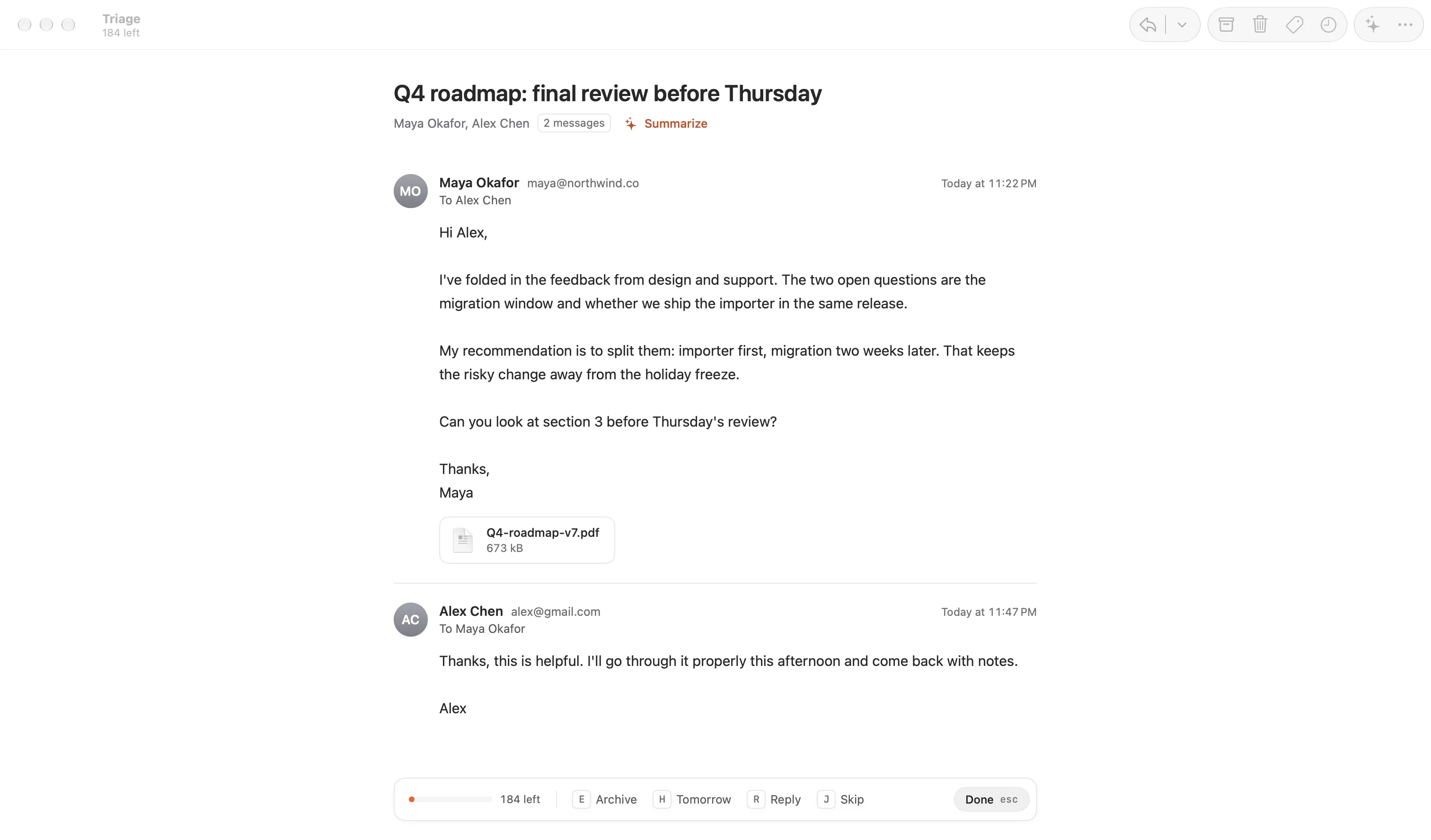
Triage
Inbox zero,
one key at a time.
Triage puts one conversation in front of you and everything else out of the way. Decide, press a key, and the next one is already there. A bar shows how close you are.
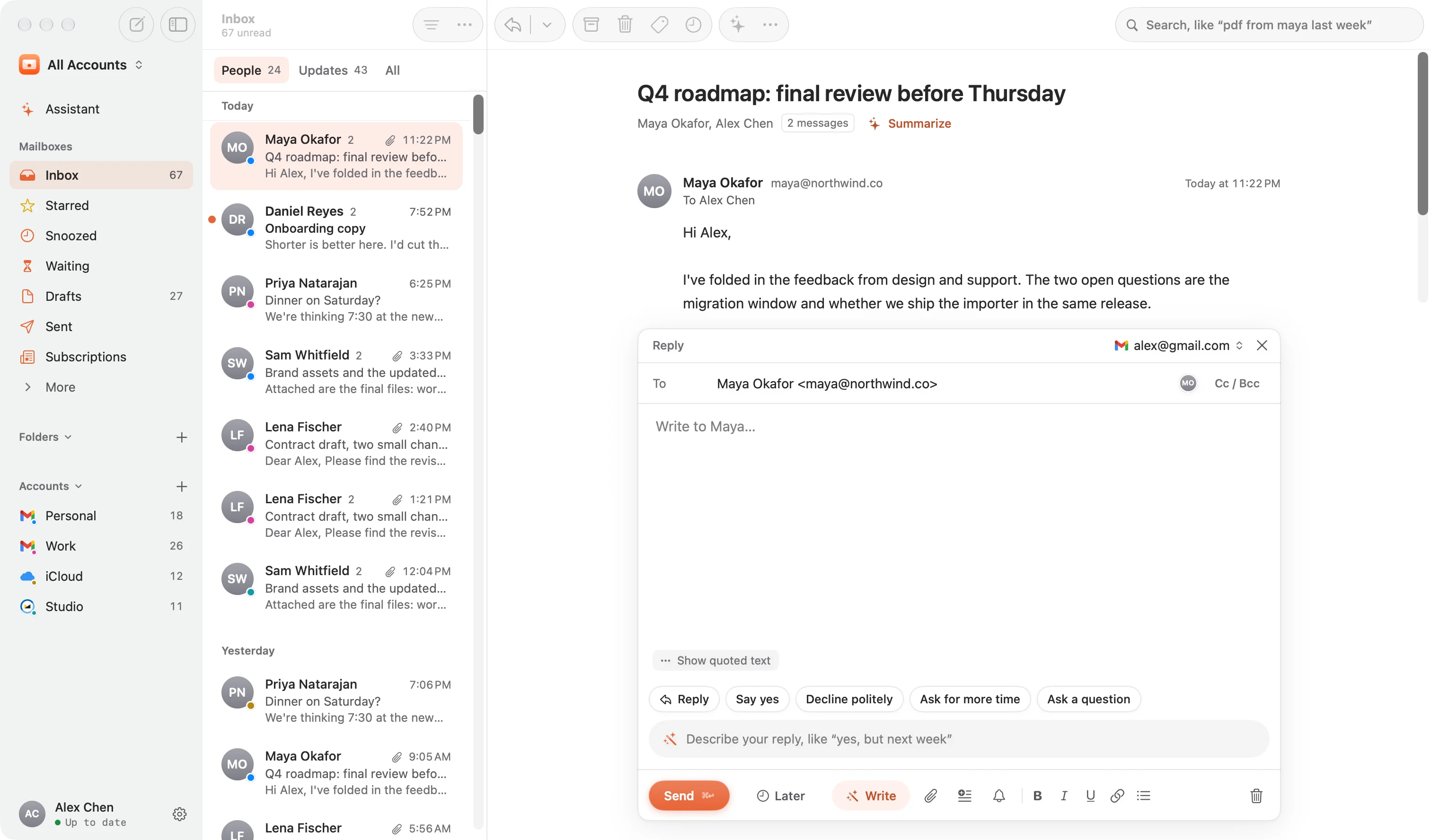
Write with AI
Describe it.
Glassmail writes it.
Say “yes, but next week” and a reply appears in your voice, learned from mail you’ve sent. Polish it, shorten it or warm it up in a click, and undo any step. It runs on your Mac with Apple Intelligence or a small model you download.
Search
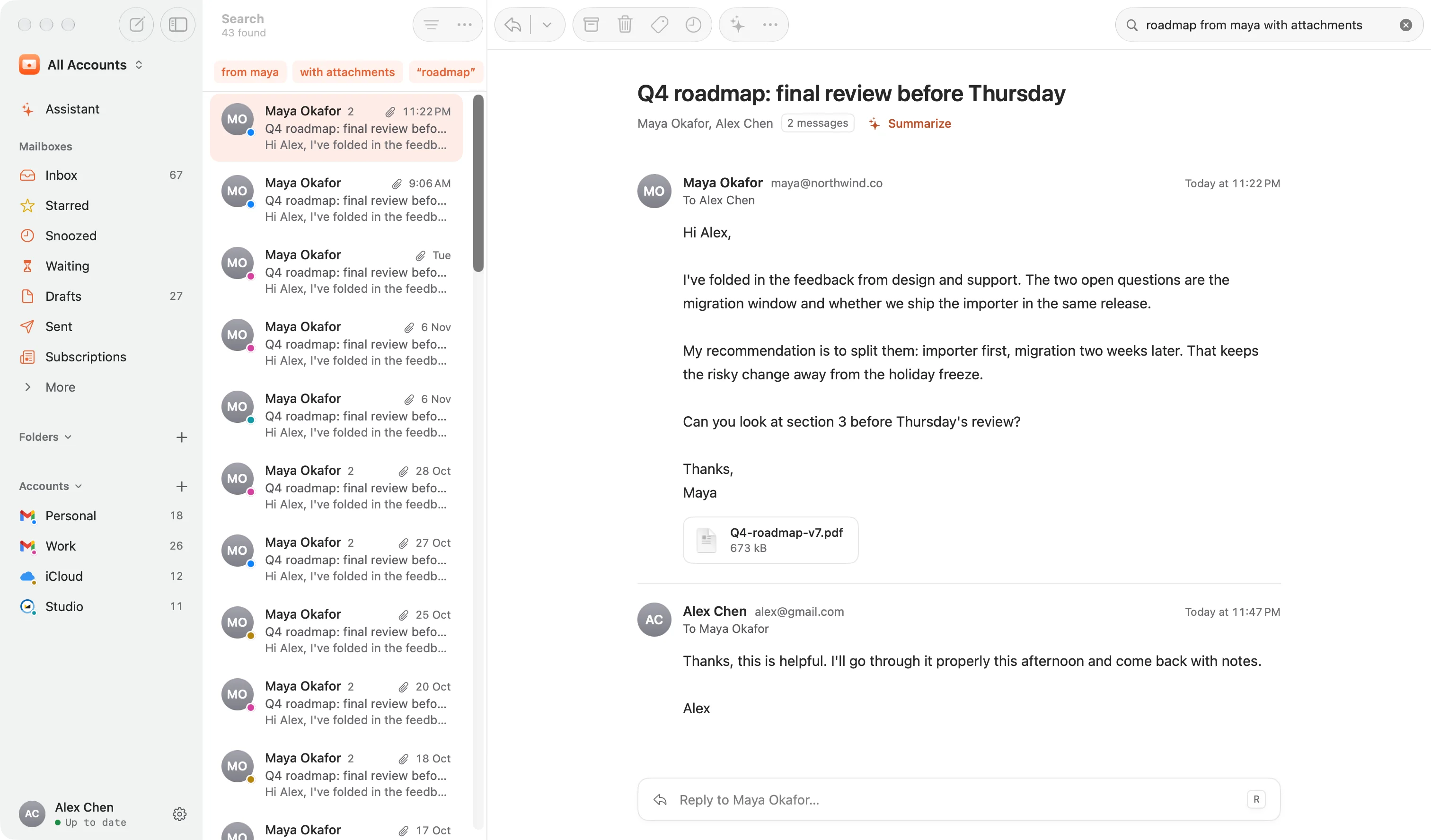
Search the way
you’d ask.
Type “pdf from maya last week” or “what I sent to daniel yesterday”. Glassmail understands people, attachments, dates and folders, then shows exactly what it understood, across every account at once.
The small things
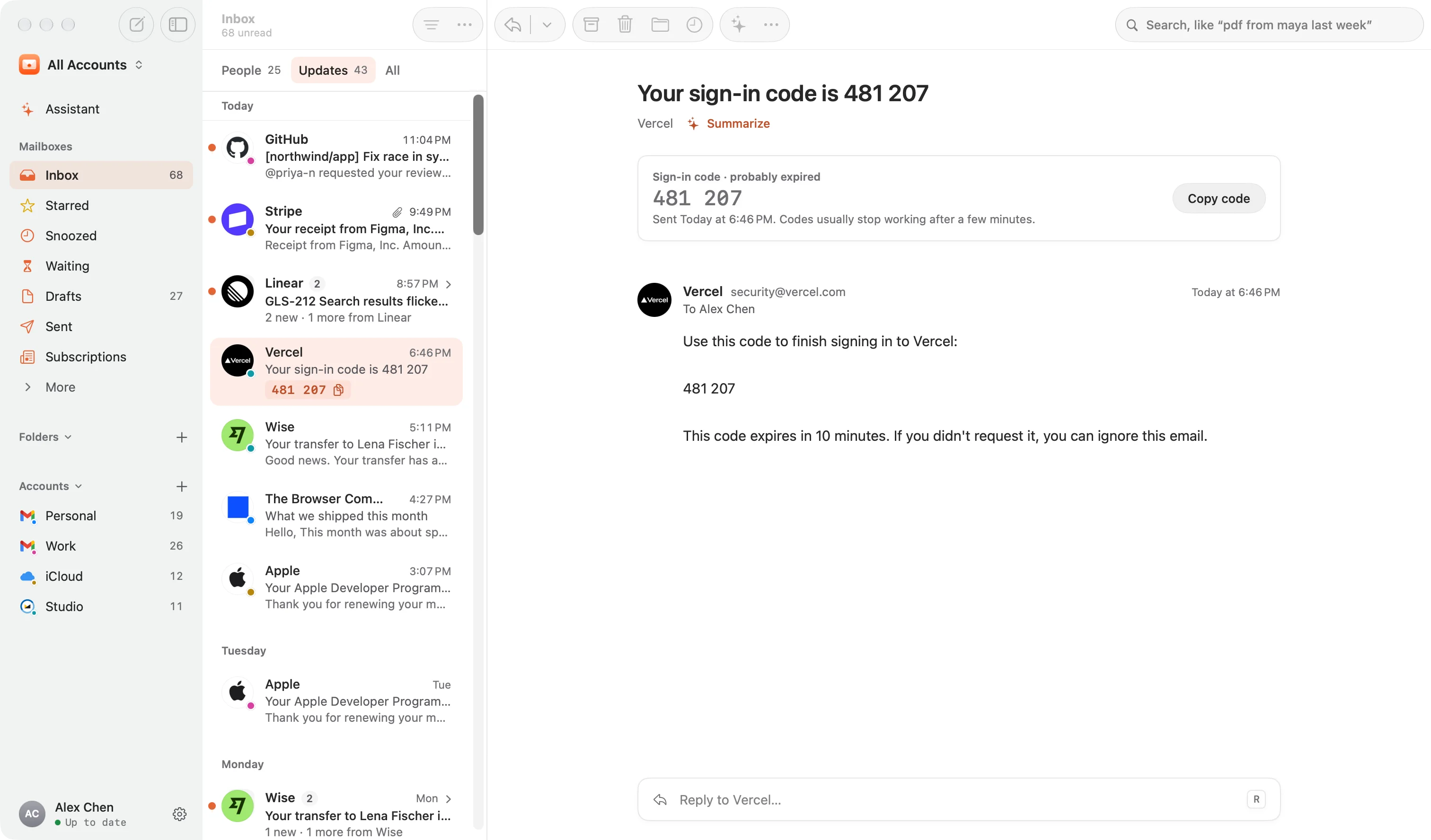
Codes, receipts and
newsletters, handled.
Sign-in codes show up in the list with a copy button, so you never open the email. Updates from the same sender fold into one row you can archive at once. The little chores of email, quietly done.
And everything else
Everything you expect.
Nothing you don’t.
People and Updates
Mail from people first. Receipts, notifications and newsletters wait in Updates, bundled by sender.
Undo send
A ring counts down the seconds you have to take it back. Your draft comes back exactly as it was.
Send later and follow-ups
Schedule a message, or get a nudge if nobody replies in three days.
Unsubscribe in one click
Every newsletter in one list, with one-click unsubscribe and archive-all.
Tracking pixels stripped
The invisible images that tell senders you opened their mail are removed first.
Works offline
Read, archive and write on a plane. It all syncs the moment you’re back.
Keyboard first
⌘K for everything, single keys for the rest: E to archive, R to reply, J and K to move.
Notifications that act
Archive, mark as read or copy a sign-in code right from the notification.
Works with your AI agents
Let Claude, Codex or Cursor search and read your mail, read-only. Never send.
Privacy
Your mail stays between you and your provider.
Glassmail has no mail server. Your Mac talks to your email provider, and every other connection it makes is listed here.
- No Glassmail mail server. Your Mac talks directly to Gmail, iCloud or your provider.
- Passwords in your Keychain. Never in a file, never anywhere else.
- AI on your Mac. Drafts and summaries are made here and stay here.
- Tracking pixels removed. Senders don’t learn when you read their mail.
- Pictures without peeking. Sender photos look up an address or domain, never anything from a message. You can turn them off.
- Licence checks, and only that. Your key, this Mac’s name and a hashed ID go to Polar, our payment provider. No mail, ever.
Compared
One payment. No subscription.
Already happy with Apple Mail? It’s free and good at the basics. Glassmail is for everything after them: people before newsletters, one-key triage, codes you never open, search you can talk to, and an assistant that knows your mail. For $14, once.
| Feature | Glassmail | Apple Mail | Superhuman | Spark | Mimestream |
|---|---|---|---|---|---|
| Price | $14 once | Free with your Mac | $25–33 a month | Free, or $99–199 a year | $49.99 a year |
| You pay | Once | Nothing | Every month | Yearly, for Premium | Every year |
| Accounts | Gmail, iCloud, Outlook, Yahoo, Fastmail, any IMAP | Gmail, iCloud, Outlook, Yahoo, any IMAP | Gmail and Outlook | Most providers | Gmail only |
| AI | Private assistant, summaries and writing, on your Mac | Apple Intelligence summaries and Smart Reply, on supported Macs | In the cloud | In the cloud, on Premium | — |
Glassmail
- Price
- $14 once
- You pay
- Once
- Accounts
- Gmail, iCloud, Outlook, Yahoo, Fastmail, any IMAP
- AI
- Private assistant, summaries and writing, on your Mac
Apple Mail
- Price
- Free with your Mac
- You pay
- Nothing
- Accounts
- Gmail, iCloud, Outlook, Yahoo, any IMAP
- AI
- Apple Intelligence summaries and Smart Reply, on supported Macs
Superhuman
- Price
- $25–33 a month
- You pay
- Every month
- Accounts
- Gmail and Outlook
- AI
- In the cloud
Spark
- Price
- Free, or $99–199 a year
- You pay
- Yearly, for Premium
- Accounts
- Most providers
- AI
- In the cloud, on Premium
Mimestream
- Price
- $49.99 a year
- You pay
- Every year
- Accounts
- Gmail only
- AI
- —
Prices from each company’s website, November 2026. Check their sites for current plans.
Pricing
Pay once. Keep it.
No subscription, no account, no seats. One price for the app and every update in version 1, and the price only goes up from here.
 Founding price · First 15 buyers
of 15 founding licences left
- Every feature, every account
- All 1.x updates
- Use it on up to 3 Macs
- AI on your Mac, no extra cost
- 14-day refund, no questions
Want to try it first? Download and use every feature free for 14 days.
The price goes up as more people buy
- FoundingFirst 15 buyers$14Now
- EarlyNext 100 buyers$29Now
- StandardAfter that$49Now
Buying today saves $35 on the standard price. Compare that with a year of most mail apps.
Which email accounts work with Glassmail?
Gmail and Google Workspace, iCloud, Outlook.com, Hotmail and Microsoft 365, Yahoo and AOL, Fastmail, and any other IMAP account, including custom domains. Glassmail finds the right servers from your address. Gmail, iCloud and Yahoo ask mail apps to use an app password; Glassmail walks you through making one in about a minute. Microsoft accounts sign in with Microsoft.
Does my email go through your servers?
No. There is no Glassmail mail server. Your Mac talks directly to Gmail, iCloud or your provider, the same way Apple Mail does. Passwords are kept in your Mac's Keychain, and your mail is stored only on your Mac. The one other thing Glassmail sends is your licence check: the key, this Mac's name and a hashed ID go to Polar, our payment provider.
What do I need for the AI features?
On macOS 26 or later with Apple silicon, Glassmail uses Apple Intelligence. On any other Mac, including Intel Macs and macOS 14 and 15, you can download a small model in Settings › AI. Either way it runs on your Mac and nothing is sent anywhere. The AI is optional; everything else works without it.
Can I try it before I buy?
Yes. Glassmail is free for 14 days with every feature, on your own accounts. After that it asks for a licence key, and your mail stays readable either way. You can also explore every screen with sample mail without connecting anything. And if it isn’t right for you within 14 days of buying, write to us for a full refund. No questions.
What does “pay once” include?
One licence works on up to three of your Macs and includes every version 1 update. There is no subscription and no account to create. If there is ever a version 2, upgrading will be optional.
What happens after version 1?
Your licence never expires. Every 1.x update is included, and Glassmail keeps working on your Macs whether or not anything comes after it. If there is ever a version 2, upgrading will be optional and paid for separately; nothing you already own stops working or becomes a subscription.
Does it run on Intel Macs?
Yes. Glassmail is a universal app for Apple silicon and Intel Macs running macOS 14 Sonoma or later.
Is it for teams?
Glassmail is made for people, not shared inboxes. There are no seats, no admin console and no shared folders.
Does it work offline?
Yes. Everything you’ve synced is on your Mac. Archive, delete, star and write while you’re offline, and Glassmail sends it all when you’re back.

Your inbox, finally calm.
Every account, one beautiful Mac app, and a price you pay once.
macOS 14 or later · Apple silicon and Intel · 14-day refund